
PIXSOFFICE / PHOTOGRAPHY BUSINESS
How to Manage a Photography Studio Workflow
A studio workflow turns a client request into a finished assignment. Make each stage, owner and handoff visible so photographers, editors and studio staff can work from the same project context.
Map a repeatable assignment into four connected handoffs: review the project, reserve the shoot time, give production an owner and track each client output. Use these examples to see which record should carry the next action.
01
02
03
04

01 / Project management
Review package value, collected payments, balance due, project dates, shoots and deliverables together. The project overview surfaces unsigned contracts, unanswered questionnaires, overdue payments, unassigned crew and open tasks so the manager can act on the right record.
02 / Photography booking
Review room timelines across the week, booked time, room facilities and the next available slot. Switch between room and crew views, choose a date and use slot presets to organise repeat session types.


03 / Production tasks
The project task view separates workflows such as albums, highlights and raw delivery. Within each workflow, group tasks into processes such as selection and design, with completion counts for each stage.
04 / Client deliverables
The deliverables table keeps the item, due date, assignee, status and note together. Review raw photos, edited photos, albums and films as individual commitments within the project.

01
02
03
04
05
06
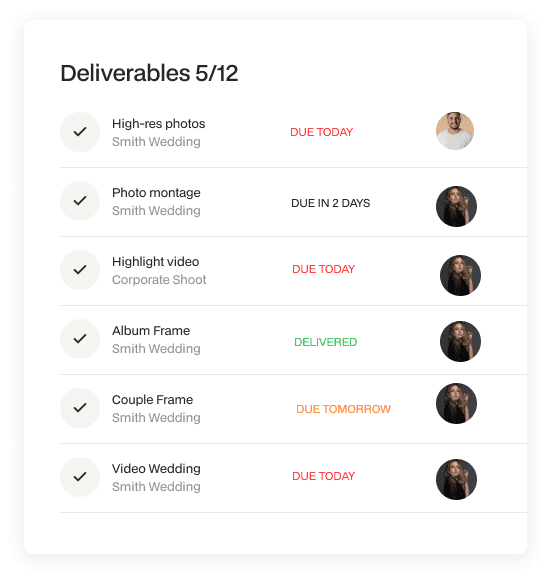
Pixsoffice deliverables view: keep the expected client outputs and their status visible.
Collect the client’s requirements, requested dates, locations and expected outputs. Record who owns the next response and what information is still missing. Keep a wedding with multiple shoot days or a commercial assignment with several outputs together under the correct project rather than splitting its history across messages.
Prepare the proposal or quotation, review the agreement and record the booking advance or payment status. Make the agreed services and deliverables understandable to the production team. A quotation describes what was sold; the task plan describes the work required to deliver it. Keep those records connected while reviewing them separately.
Assign the photographer, assistants and other crew needed for each shoot. Review the schedule and make the project brief available to the people responsible for capture. When an assignment spans several days, confirm the crew and responsibility for every day. A change to a client’s date should prompt a review of the affected team and production plan.
Break the remaining work into stages such as culling, editing, retouching and album design. Your team performs image work in its chosen editing tools; Pixsoffice tracks the related tasks, responsibilities and handoffs. Review due dates and pending dependencies so a project does not appear complete simply because the shoot is over.
Share the curated photographs for client selection, then route those choices to the team preparing the next output. Album proofing is a separate review of layouts and revisions. Make the current review stage and next action clear before preparing another version. AI guest photo search serves another purpose: helping people find photographs containing them.
Check which photographs, videos, albums or galleries are ready, which are waiting on a client decision and who owns the final handoff. Review payment follow-up alongside production, since a completed delivery and a paid balance are different milestones. Keep the project history useful for future enquiries and repeat clients.
Use this photography workflow chart as a starting point. Assign an owner and completion check at every handoff.
01 / Enquiry and booking
Collect the brief, agree the scope and review the contract and payment schedule.
02 / Shoot preparation
Reserve time and space, confirm the crew and prepare the shot list.
03 / Editing and client review
Track file handoff, editing, photo selection and album feedback.
04 / Final delivery
Review approved outputs, remaining tasks and the client’s final access links.
Test a representative assignment with your team, review the current plan and contact us about any country-specific billing or integration requirements.
